


IPTV Player - Live TV Online
4.2106.00 Reviews
App Specs
- Version
- 34
- Updated On
- License
- Free
- Downloads
- 10,000,000+
- Developer
- TextSoft.Studio
- Categories
- Video Players & Editors
- Platform
- Android, iOS
Screenshots


 Analysis by AppCompare
Hey there, fellow streamers! If you’re anything like me, constantly on the lookout for the next best app to elevate your TV watching experience, then you might want to stick around. I recently got my hands on the IPTV Player: Smarters Watch TV app, and let me tell you, it’s been quite the ride. Whether you’re a casual viewer or a binge-watching enthusiast, this app promises to make your TV time smoother and more enjoyable. Let’s dive into what makes this app tick.
First Impressions and Setup
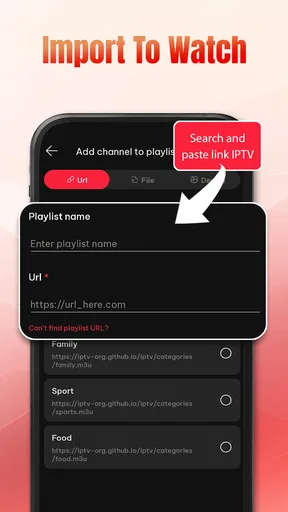
When I first launched the IPTV Player: Smarters Watch TV, I was greeted with a clean, intuitive interface. The app does a fantastic job of not overwhelming you with too many options right off the bat. Right from the start, it felt like a premium service, even though it's available for free download on both Android and iOS. Setting it up was a breeze. You simply need to input your IPTV service details, and voila, you’re good to go! No fuss, no muss.
Features Galore
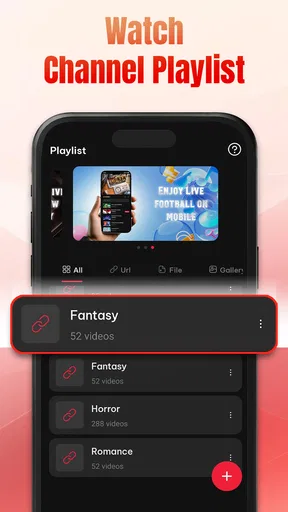
One of the coolest features is the ability to manage multiple playlists. If you’re subscribed to various IPTV services, this feature is a lifesaver. The app allows seamless switching between these playlists, making it super convenient for users who like variety. Additionally, the app supports a wide array of formats, so compatibility issues are practically non-existent.
I also appreciated the built-in video player, which supports HD quality streaming without any hiccups. The playback is smooth, with excellent audio-visual synchronization, and there's even an option for subtitles. For us subtitle lovers, this is a godsend.
User Experience
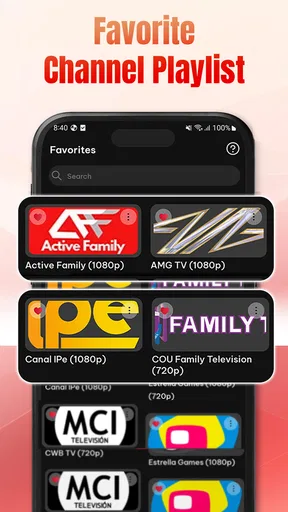
Let’s talk about the user experience. The navigation is seamless, with a logical layout that even a tech novice can handle. The app developers clearly put a lot of thought into making it user-friendly. You can easily browse through channels, search for specific content, or even create a favorites list. The search function is particularly robust, helping you find the exact content you’re in the mood for.
Another neat feature is the parental control option. As someone who occasionally has younger family members using my devices, being able to restrict certain content is crucial. The app makes it easy to set up these controls, ensuring that everyone in the household can enjoy TV safely and appropriately.
Performance and Reliability
Performance-wise, the app is solid. I noticed minimal buffering, which is impressive given that streaming quality can often vary based on your internet connection. The app seems to have excellent optimization, as it runs smoothly without putting a strain on your device’s resources. Battery consumption remains moderate, which is a relief for those long binge sessions.
Worth Reading Before You Choose

EA SPORTS FC Mobile 26 Is a Bigger Football Game, but It Takes Time

Flipboard Shows What News Apps Must Do Beyond the Feed

Switching to Android Auto Means Rethinking Your Driving Routine

Google Calendar Makes a Crowded Week Easier to Manage

Ludo King Makes the Most of the Minutes Between Plans

Baby Panda World Brings Quick Play to Modern Phones, but Its Game Library Feels Busy
Reliability is another strong suit of the IPTV Player: Smarters Watch TV. In my time using it, I didn’t experience any crashes or bugs, which is a testament to the app’s stability and robust design. Updates are regular, addressing any minor issues and ensuring compatibility with the latest devices.
Final Thoughts
So, is the IPTV Player: Smarters Watch TV worth downloading? Absolutely. It offers a comprehensive streaming experience that’s hard to beat. From its user-friendly interface to its robust features and stellar performance, this app stands out in a crowded market. Whether you’re just dipping your toes into the world of IPTV or you’re a seasoned pro, this app is definitely worth a try.
If you’re interested in checking it out, you can find the download links for both Android and iOS on our website. Give it a whirl and see if it transforms your TV watching experience as it did mine. Happy streaming!
Pros
- User-friendly interface for easy navigation.
- Supports multiple streaming formats.
- Allows parental controls for safe viewing.
- Customizable playlists for convenience.
- Compatible with various devices.
Cons
- Requires a stable internet connection.
- Limited offline viewing options.
- Ads can be intrusive at times.
- Some premium features require payment.
- Setup can be complex for beginners.
FAQs for IPTV Player - Live TV Online
What is IPTV Player: Smarters Watch TV?
IPTV Player: Smarters Watch TV is an application that allows users to stream live television, on-demand content, and radio directly to their Android or iOS devices. It supports a variety of popular formats and offers a user-friendly interface for easy navigation and content management.
Is IPTV Player: Smarters Watch TV free to use?
The app itself is free to download, but users need to provide their own IPTV subscription for content access. It acts as a player for IPTV services, which usually require a separate paid subscription from a third-party provider.
Can I use IPTV Player: Smarters Watch TV on multiple devices?
Yes, you can use the app on multiple devices, but each device will require the app to be installed separately. However, you will need to check with your IPTV provider regarding the number of devices allowed under your subscription plan.
What features does IPTV Player: Smarters Watch TV offer?
The app offers a range of features including live TV streaming, video on demand (VOD), electronic program guide (EPG) support, parental controls, and the ability to record live TV. It also supports multiple formats and has a customizable interface for user convenience.
Is IPTV Player: Smarters Watch TV legal to use?
Using IPTV Player: Smarters Watch TV is legal, but legality also depends on the content source. Ensure that you use legitimate IPTV services that have the rights to their content. Unauthorized streaming can infringe on copyright laws, so it's important to verify the legitimacy of your content provider.


